
Intro to React
and a Drupal integration example
What is it?
A JavaScript library to handle frontend applications. It will allow you to handle the rendering of a data model efficiently and beautifully. Ideal for SPAs.- Declarative
- Unidirectional data flow: props flow down, actions flow up
- Based on components
- Virtual DOM
What it is Not
It is not a Framework so...- Does not handle routes
- Does not organize your files sanely
- Does not handle data fetching or updates
Practice setup - Vite + React
Vite + React scaffolding
              npm create vite@latest vite-react-app -- --template react
              vim -O src/App.{jsx,css}
Example 1 - Hello World!
Reads a value from an input field and updates the page.Example 2 - Simple Calculator
Two inputs, a dropdown for operation section and automatic display of resultExample 3 - Tic Tac Toe?
Tutorial: Tic-Tac-ToeThinking in React
This practice is recommended for after the examples in the docs but will be very helpful for when you work on bigger projects. Thinking in ReactData structure
              [
                { category: "Fruits", price: "$1", stocked: true, name: "Apple" },
                { category: "Fruits", price: "$1", stocked: true, name: "Dragonfruit" },
                { category: "Fruits", price: "$2", stocked: false, name: "Passionfruit" },
                { category: "Vegetables", price: "$2", stocked: true, name: "Spinach" },
                { category: "Vegetables", price: "$4", stocked: false, name: "Pumpkin" },
                { category: "Vegetables", price: "$1", stocked: true, name: "Peas" }
              ]
Mockup
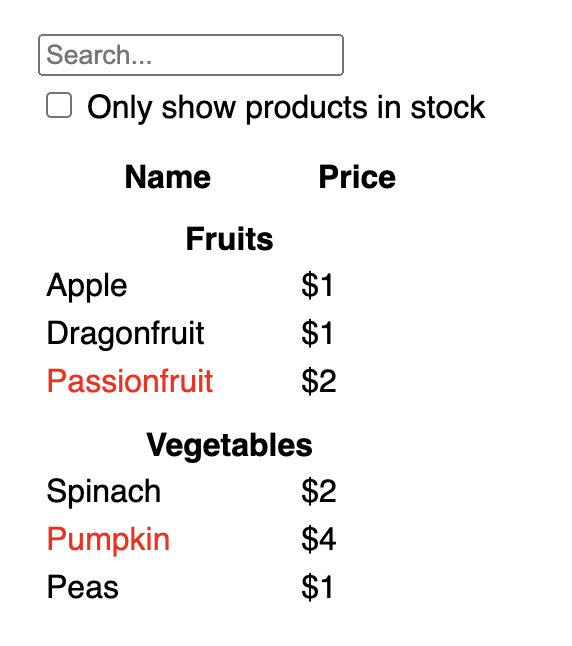
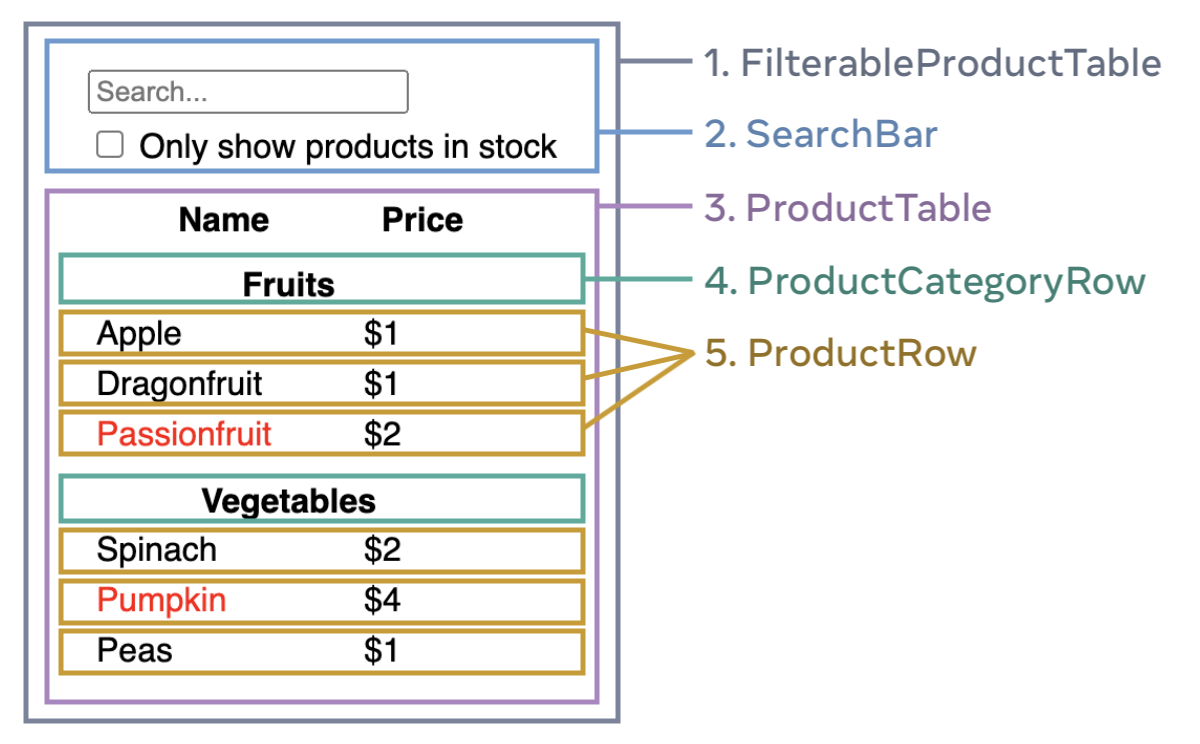
Step 1: Break the UI into a component Hierarchy
- The mockup and data structures will guide this process
- If your data is well structured it will probably map directly to the hierarchy
- Use your criteria and experience to guide decisions
Step 2: Building a static version in React
- Build components passing data down with PROPS
- Top-down works well for small projects but in bigger projects Bottom-up is your best bet
- No interactivity yet!
Step 3: Find the minimal but complete representation of UI state
- Similar to DB normalization
- If the data chages over time, is passed via props from a parent component or is computed based on other data it is state
- Don't Repeat Yourself
Step 4: Identify where the state should live
- Identify every component that redners something based on the state
- Find the closest common parent Component
- Decide where to put the state: the common parent, a parent of it or a new component just to hold state.
Step 5: Add inverse data flow
This will allow our app to update state changes as react uses one-way data binding.Connect the functions that
setState to each component that needs to update it.
Escape Hatches
This are used when you need to interact with non-React parts of a siteRefs
- Similar to state but they do not trigger re-renders
- Can be used to intereact with elements via the browser DOM APIs:
document.getElementByID(ref).scrollIntoView()
Effects
Used to syncronize a component with an external system (APIs, external state, etc)- Triggered when the conditions change
- Return a destructor to be called before invoking the effect again